
Google Reviews Not Showing? How to Tell a Bug From a Removal, Delay or Restriction (November 2026)
Quick answer: If Google shows “No reviews” for your business, first click into your Business Profile. If your reviews and rating appear there, it is most likely the local pack display bug reported on 26 November 2026, not lost reviews. If they are gone everywhere, check for policy removals, screening delays, a profile merge or a restriction email.
What happened on 26 November
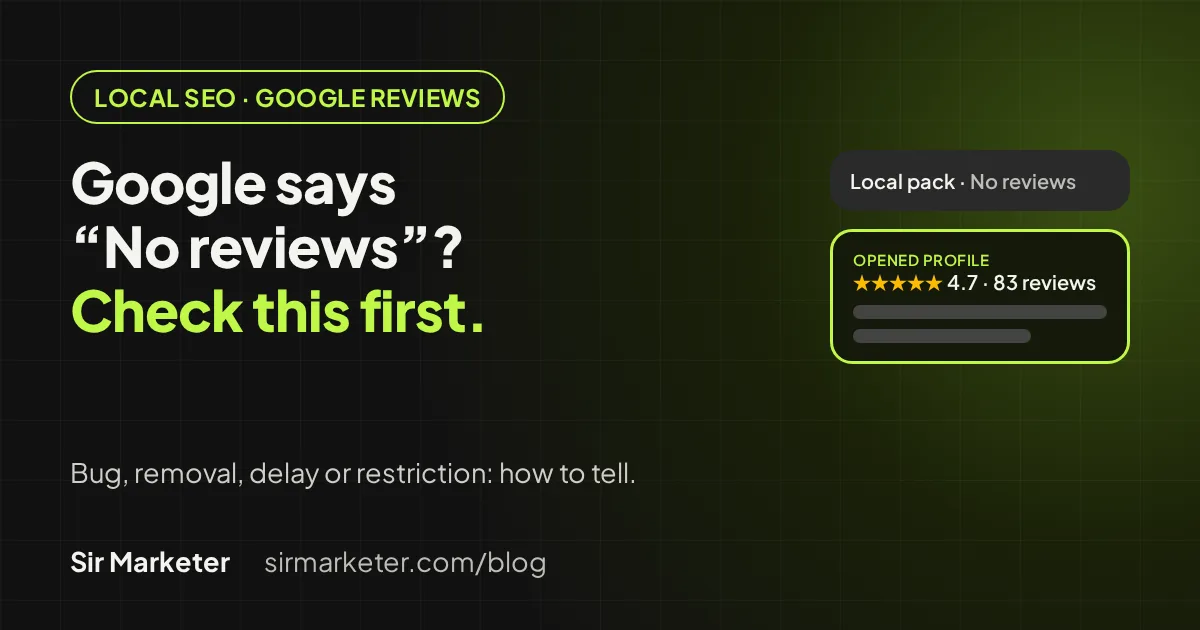
On Thanksgiving Day, 26 November 2026, Search Engine Roundtable reported that Google was showing “No reviews”, with no stars, in the local pack for some businesses that do have reviews. When you click into the listing, the reviews and rating are there (Search Engine Roundtable).
Editor Barry Schwartz said he could replicate it “across tons of queries”, including on his own company’s listing, which showed “no reviews” in the local pack but 83 reviews with a 4.7 average once opened. He also noted that not every business is affected, and that some listings show their reviews at some times and not at others (Search Engine Roundtable; Barry Schwartz on X). The issue was first flagged on X by Syed Amir (Search Engine Roundtable).
At the time of writing Google had not commented. The timing is bad: Black Friday, Small Business Saturday and Cyber Monday are when shoppers compare local businesses by star rating. So it pays to tell this display problem apart from the reasons reviews really do go missing, before you change anything.
The 5-minute check: bug, delay, removal or restriction?
Check Google Search and Maps, in a normal and a private (incognito) window.
| What you see | Likely cause, and what to do |
|---|---|
| “No reviews” in the local pack, but reviews and rating show when you open the listing | The display bug reported on 26 November (SER). Nothing on your profile. Screenshot it with the date and keep collecting reviews as normal. |
| One or two new reviews haven’t appeared yet | Policy screening, which Google says can take a few days (Google). Wait a few days. Ask the customer to check they posted while signed in to Google and are on an up-to-date Maps app. |
| Older reviews have disappeared from the profile everywhere | Removal for spam or another policy violation (Google). Check whether the reviews broke a rule. If they were genuine, contact Business Profile support. |
| Reviews went missing after merging or reinstating a profile | Merge sync delay, or removal after reinstatement (Google). Allow a few days after a merge. After reinstatement, contact support. |
| No reviews show, new ones can’t be posted, or a banner says suspicious reviews were removed | A fake engagement restriction, or a temporary pause after a spam attack (Google; Google). Look for Google’s email, then appeal if you believe the decision is wrong. |
Sources: Google Business Profile Help: About missing or delayed reviews; Business Profile restrictions for policy violations; Search Engine Roundtable.
The real reasons Google reviews go missing
Google’s own help page lists the main reasons, and says that usually reviews are removed for policy violations like spam or inappropriate content (Google). Here is each one in plain terms.
1. A display bug
If the reviews are still there when you open your profile, nothing is lost. The 26 November problem affects how the local pack shows them (Search Engine Roundtable). Editing your profile won’t fix a Google display issue.
2. Reviews still being checked
Google screens reviews against its policies, and says this can take a few days. It also says customers on older phones or software may have trouble posting, and recommends updating the Maps app (Google). Customers must be signed in to a Google Account to leave a review, though it doesn’t have to be a Gmail address (Google).
3. Reviews removed for breaking a rule
Google’s Maps content policy removes “fake engagement”: reviews that aren’t based on a real experience, reviews paid for “directly or in kind”, and content posted from multiple accounts by one person. It also removes reviews based on a conflict of interest, such as current or former employees, contractors, competitors or family members (Google Maps content policy). Google says reviews removed for policy violations won’t be restored (Google).
Google also admits its automated spam detection “may also mistakenly remove legitimate reviews”, and says to contact support if that happens (Google).
4. A merge or reinstatement
After merging two Business Profiles, Google says it can take a few days for reviews from both to show. Reviews can also be removed after a profile is reinstated; Google’s advice is to contact support (Google).
5. Reviews temporarily turned off
Google may temporarily disable reviews for certain profiles or business categories to protect owners (Google). In April 2026 Google said that when it sees a sudden spike in spam reviews, for example in a scam demanding money to remove fake one-star reviews, it will remove the fake content, pause new reviews, alert the owner and show consumers a banner explaining why (Google).
6. A restriction for fake engagement
This is the serious one. If Google decides a business has violated its fake engagement policy, it can stop the profile receiving new reviews for a set period, unpublish existing reviews for a set period, and show a warning that fake reviews were removed. Google says it emails the owner before applying a restriction (Google; Google Transparency Report).
Step-by-step: what to do for each case
If it’s the local pack bug
- Open your listing from the local pack and confirm the review count and rating are there.
- Take dated screenshots of the pack and the opened listing, in normal and incognito windows.
- Don’t edit your name, category or address to “fix” it, and don’t create a new profile.
- If reviews vanish inside the opened listing too, move to the next section.
If genuine reviews were removed
- Note how many reviews are missing, the reviewer names, roughly when they went and whether new reviews still publish. These are the details a Google community manager asked owners to include when reporting missing reviews (Search Engine Roundtable).
- Find your Business Profile ID and gather screenshots of the missing reviews if you have them.
- Contact Business Profile support from the Help Center and choose the missing reviews option (Google).
- Be honest with yourself: if the reviews came from staff, family or an incentive, they broke the policy and won’t come back (Google).
If there is a fake or abusive review you want removed
- Open your Business Profile, select Read reviews, then Report next to the review, pick the reason and send (Google).
- Track it in the Reviews Management Tool. Google says evaluation typically takes several days.
- If the status says “Report reviewed – no policy violation” and you disagree, you can submit a one-time appeal for up to 10 reviews (Google).
- Only report reviews that break a rule. Google says it won’t remove a review just because you disagree with it (Google). If someone is demanding money to stop one-star reviews, use Google’s extortion reporting route instead.
If your profile has a restriction
- Find Google’s email about the restriction and read which policy it cites (Google).
- Stop whatever caused it: incentives, review swaps, bought reviews or staff reviews.
- Appeal through the Business Profile appeals tool with clear evidence. Google says appeals can take up to 5 business days, can only be submitted once, and you shouldn’t send repeat appeals or create a new profile for the same business (Google).
What not to do, especially this week
Panic fixes do more damage than the bug. Avoid these:
- Don’t offer a discount or gift for a review. Google strictly prohibits incentives for posting, changing or removing reviews (Google). A “10% off for a 5-star review” Black Friday sign is exactly what this rule targets.
- Don’t only ask happy customers. Google doesn’t allow merchants to discourage negative reviews or “selectively solicit positive reviews”, or to pressure people to review while on your premises (Google).
- Don’t have staff, friends or family post reviews. These are conflict-of-interest reviews under Google’s policy (Google).
- Don’t buy reviews or “review recovery” services. Beyond Google’s rules, it can be illegal. The US FTC’s rule on consumer reviews, effective 21 October 2024, bans buying fake reviews, paying for reviews of a particular sentiment and certain undisclosed insider reviews (Federal Register). In the UK, the CMA’s guidance says fake reviews and concealed incentivised reviews are banned under the DMCC Act (GOV.UK; CMA208). Canada’s Competition Bureau warns businesses can be liable for employee reviews that don’t disclose the connection (Competition Bureau Canada), and Australia’s business.gov.au guidance covers fake and incentivised reviews too (business.gov.au).
- Don’t delete and recreate your profile. You lose history and risk a duplicate-profile problem (Google).
This is general information, not legal advice. Check the linked regulator guidance for your country.
Protect your rating through the holidays
You can’t fix a Google bug, but you can stop a missing star rating costing you the customer.
Ask every customer, the allowed way
Google recommends sharing your review link or QR code with customers (Google). Put it on receipts, follow-up messages and a counter card, and ask everyone. A sudden burst of reviews after a promotion can look like the “unusual volumes or patterns” Google’s policy describes (Google).
Reply to reviews, briefly and personally
Google’s tips: be professional, keep it short, don’t use replies to push deals, never share a reviewer’s private details, and reply promptly (Google). Replies are public, so future customers read them too.
Show genuine reviews on your own website
If shoppers can’t see your stars in the local pack, your website is where they land next, so show real, attributed reviews and link to your Google profile. Keep it honest: the FTC rule bars implying the reviews on your site represent all or most reviews if you have suppressed negative ones (Federal Register).
Make the follow-up automatic
Review requests get forgotten when nobody has time to send them. An automated text or email after each completed job, with your review link and no incentive, fixes that. For the rest of your listing, see our Google Business Profile optimisation guide and local SEO checklist.
Quick checklist
- Open your listing from the local pack: are the reviews there once opened? If yes, it’s probably the display bug.
- Screenshot the pack and the listing with the date, in normal and incognito windows.
- Check your email (and spam folder) for any Google Business Profile restriction notice.
- List missing reviews: how many, reviewer names, when, and whether new reviews publish.
- Contact Business Profile support for genuine reviews that were removed.
- Report only reviews that break a rule, then use the one-time appeal if needed.
- Appeal a restriction once, with evidence, and stop any incentive or staff reviews.
- Keep asking every customer with your review link or QR code, and never offer a reward.
- Add genuine reviews and a link to your Google profile on your own website.
- Recheck weekly until the stars are back in the local pack.
Where Sir Marketer can help
- Your reviews or profile need fixing: our online reputation management and small business reputation management services cover review requests, replies and Business Profile health, within Google’s rules.
- You want review requests sent automatically: see our AI receptionist or try the missed-call text-back demo.
- Your website doesn’t show your reviews: request a free live website preview and see a version with a proper reviews section before you decide anything.
- Your site needs FAQ markup: use the free FAQ schema generator.
Worried about your Google reviews this holiday season? Sir Marketer helps small businesses in the US, Canada, the UK, Australia and Singapore keep their Google Business Profile and reviews healthy. Book a free call and we will look at your listing with you.
Frequently asked questions
Why does Google say “No reviews” when my business has reviews?
Since 26 November 2026 Google has shown “No reviews” in the local pack for some businesses that do have reviews; the reviews appear when the listing is opened. If yours show once opened, it is a display issue, not lost reviews.
Why are my Google reviews disappearing?
Google says reviews are usually removed for policy violations such as spam, fake engagement or conflict-of-interest reviews from staff or family. Its automated spam filter can also remove genuine reviews by mistake; in that case contact Business Profile support.
Why is a new Google review not showing yet?
Google checks reviews against its policies and says this can take a few days. Also make sure the customer was signed in to a Google Account and is using an up-to-date Google Maps app.
Can removed Google reviews be restored?
Google says reviews removed for policy violations won’t be restored. If genuine reviews were removed by mistake, or vanished after a profile reinstatement, contact Business Profile support with the details.
How long does a Google review restriction last?
Google says restrictions apply for a set period of time but doesn’t publish a length. You can appeal once through the Business Profile appeals tool; Google says decisions can take up to 5 business days.
Can I offer a discount for Google reviews?
No. Google strictly prohibits incentives for posting, changing or removing reviews, and the US FTC rule and UK DMCC Act also restrict incentivised and fake reviews. Ask every customer with your review link instead.
Sources
- Search Engine Roundtable: Google Local Pack No Reviews Bug (26 November 2026)
- Barry Schwartz on X: Google local pack “no reviews” bug (26 November 2026)
- Google Business Profile Help: About missing or delayed reviews
- Google Business Profile Help: Report inappropriate reviews on your Business Profile
- Google Business Profile Help: Tips to get more reviews
- Google Business Profile Help: Business Profile restrictions for policy violations
- Google Business Profile Help: Appeal Business Profile content & profile restrictions
- Google Maps: Prohibited and restricted content (user contributed content policy)
- Google Blog: New ways we’re protecting businesses on Maps (16 April 2026)
- Google Transparency Report: Maps content trust and safety, fighting fake reviews
- Search Engine Roundtable: Google Maps reviews troubleshooting for missing and removed reviews (1 July 2024)
- Federal Register: FTC Trade Regulation Rule on the Use of Consumer Reviews and Testimonials (22 August 2024)
- GOV.UK (CMA): Reviews and social media endorsements, what businesses must know
- CMA208: Fake reviews guidance
- Competition Bureau Canada: Online reviews posted by employees, businesses could be liable (18 January 2024)
- business.gov.au: Online reviews
Written by Utkarsh Arora. Published 2026-11-27. Guidance is taken from Google’s own help pages, regulator guidance and the linked reporting on the date above. Google had not commented on the local pack bug at the time of writing; we will update this post if it does.