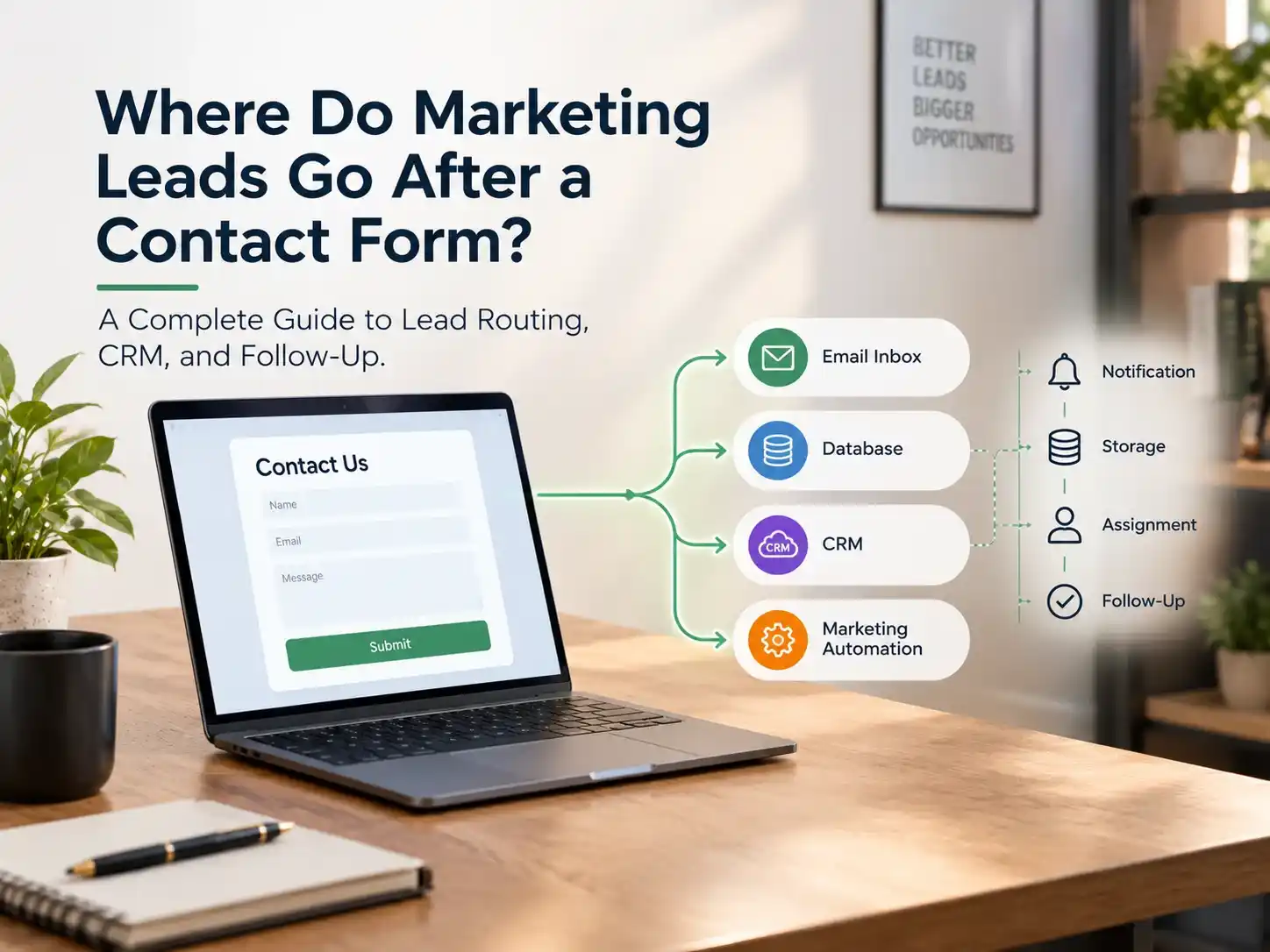
The outcome varies based on the form’s setup and configuration. Submissions may be emailed to an inbox, saved in a website or form database, sent to a CRM, or passed to a marketing automation tool. Notification, storage, assignment, and follow-up are separate steps, so verify your actual form settings and integrations instead of assuming leads are handled automatically.
When someone submits a contact form, the inquiry does not always reach the sales team automatically. For example, a plumbing company may display a “Thanks, we’ll be in touch” message while the lead remains in an unmonitored inbox, a form plugin, or a CRM that nobody checks.
Here’s what you need to know:
Understanding this process helps you identify gaps and ensure that potential customers don’t slip through the cracks.
Some businesses use one destination. Others use several at once: stored in one place, copied to a second, routed through a third. This is a comparison of common configurations, not a guarantee that your form uses any of them.
Destination |
What happens there |
What to verify |
|---|---|---|
Email inbox
|
A notification arrives
|
Correct recipient, spam filtering, ownership
|
Website/form database
|
Entry may be saved
|
Whether storage is on, retention, access, backups
|
CRM
|
Contact or lead record created or updated
|
Field mapping, duplicates, assignment
|
Marketing automation
|
A workflow may start
|
Triggers, consent, segmentation
|
Spreadsheet or lead database
|
Details recorded
|
Accuracy, access control, duplicates
|
Help desk
|
Inquiry becomes a ticket
|
Sales inquiries reach the right team
|
Custom integration
|
Data sent to an API or internal system
|
Error handling, confirmed delivery
|
It varies by platform. Some form plugins store every entry in the site’s database by default (Gravity Forms, for example, describes entries and notifications as separate features), while others mainly forward data elsewhere. Check the form’s entry area, retention settings, and your privacy policy.
Usually only if the form or a connected tool is set up to do it. A customer relationship management (CRM) system organizes contact records, interactions, and sales opportunities, but a connected CRM does not guarantee every submission syncs.
Leads may stay in email, in the form’s own entry list, or get copied into a spreadsheet by hand. That can work at low volume, but manual handoffs raise the risk of delays, duplicates, and weak attribution. It isn’t automatically a problem.
Steps vary by platform.
A common sequence looks like this: visitor → submission → validation and capture → storage and integrations → CRM record → routing and assignment → notification and follow-up → qualification → sales pipeline → conversion or disqualification. This is an example, not a universal order. Steps can overlap, happen differently, or not happen at all.
Capture. The form checks required fields and spam protection, then processes the submission. Typical contact form data includes name, email, phone, message, service of interest, landing page, timestamp, and consent status. Collect only what you need. A front-end success message does not prove every downstream integration worked.
Storage. The data lands in a form entry system, CRM, database, or spreadsheet.
Routing and assignment. Routing decides where a lead goes (team, queue, or person). Assignment makes one person or team responsible. Notification alerts them. A CRM record can exist with no owner, and an owner can exist with no follow-up task.
Follow-up. An internal alert, an automatic acknowledgment, a personal reply, and a multi-step sequence are four different things. An automatic acknowledgment does not prove a human has responded.
Qualification and pipeline. The team judges fit, need, timing, or budget. Some companies separate marketing qualified leads (MQLs) from sales qualified leads (SQLs); many don’t. Illustrative pipeline stages: new, assigned, contacted, qualified, proposal, won or lost.
Tracking. CRM and analytics data show lead source, response time, and outcomes, but accuracy depends on field mapping and data quality.
Lead routing directs incoming inquiries to the right team or person, while lead assignment establishes ownership and lead distribution balances workloads.
Common routing methods include:
Automated routing checks predefined rules, assigns an eligible owner, and sends a notification. Add a fallback rule to prevent unassigned leads.
Common issues: Missing form fields, incorrect field mapping, outdated rules, unavailable owners, or failed integrations.
Small businesses may only need a shared inbox and clear ownership, while larger teams can benefit from CRM-based routing rules.
Website-to-CRM integration moves form data into a CRM so you can manage the lead past the first inquiry. Common methods:
Follow the platform’s official setup instructions and test. Pay attention to field mapping, duplicate handling, assignment, error alerts, source attribution, and consent settings. Storing a record is also different from running automation: a CRM follows up only if workflows are configured.
Common causes: wrong notification addresses, spam filtering, unmonitored inboxes, staff turnover, no lead owner, failed integrations, duplicate records, no after-hours process, and unclear marketing-to-sales handoff.
Problem |
Likely consequence |
Fix |
|---|---|---|
Relying only on email
|
Missed or untracked inquiries
|
Add reliable storage and ownership
|
Assuming the CRM got everything
|
Silent sync failures
|
Test record creation, monitor errors
|
No lead owner
|
Nobody feels responsible
|
Define rules or a monitored queue
|
Bad field mapping
|
Missing or wrong data
|
Audit mappings
|
No duplicate handling
|
Inconsistent outreach
|
Configure duplicate rules
|
Over-complicated automation
|
Hard to maintain
|
Automate only clear needs
|
Speed to lead refers to the amount of time taken to provide the first meaningful response after receiving an inquiry. It is a useful operating metric, but no single response time suits every business, so set a target your team can consistently meet. To improve lead response time: use reliable internal alerts, assign every inquiry an owner, set after-hours rules, monitor unassigned leads, and add escalation rules for unattended ones.
Marketing automation connects submissions to predefined workflows. Useful pieces include:
A streamlined process involves receiving the submission, verifying the details, recording the information, syncing it with the CRM, assigning responsibility, sending notifications and acknowledgment, scheduling follow-ups, monitoring responses, and updating the status. Adapt it to your tools.
Sir Marketer LLC helps businesses strengthen their online presence, attract potential customers, and improve digital marketing performance through practical, data-driven strategies.
Our services include:
Whether you want to attract more leads or improve your website’s performance, Sir Marketer can help you build a more effective digital marketing strategy.
Contact form submissions can go to many destinations. Notifications, data storage, routing, task assignment, and follow-up each serve a distinct purpose and should be tested individually. CRM integration can centralize records, automation can reduce manual handoffs, and tracking should continue past the submission. The right setup depends on your volume, team, and systems.
Start by auditing one existing form from submission through sales follow-up before adding tools. If you want a second pair of eyes, Sir Marketer’s team can help review your digital marketing setup.
Usually to email, the form’s entry list, or a spreadsheet, depending on setup.
No. A CRM receives data only through a configured integration.
The lead may go unanswered unless entries are stored elsewhere or alerts escalate.
Through email alerts, CRM assignment, or manual handoff, depending on configuration.
Capture receives the inquiry; nurturing is relevant communication over time.
MQLs meet marketing’s criteria; SQLs meet sales’ criteria. Definitions vary by company.
Our team will answer all your questions, We ensure a quick response.